
 Marketplace Configurations
Connecting to Etsy
Connect your Etsy shop to Market Sync by adding the connection and authorizing access to your Etsy account.

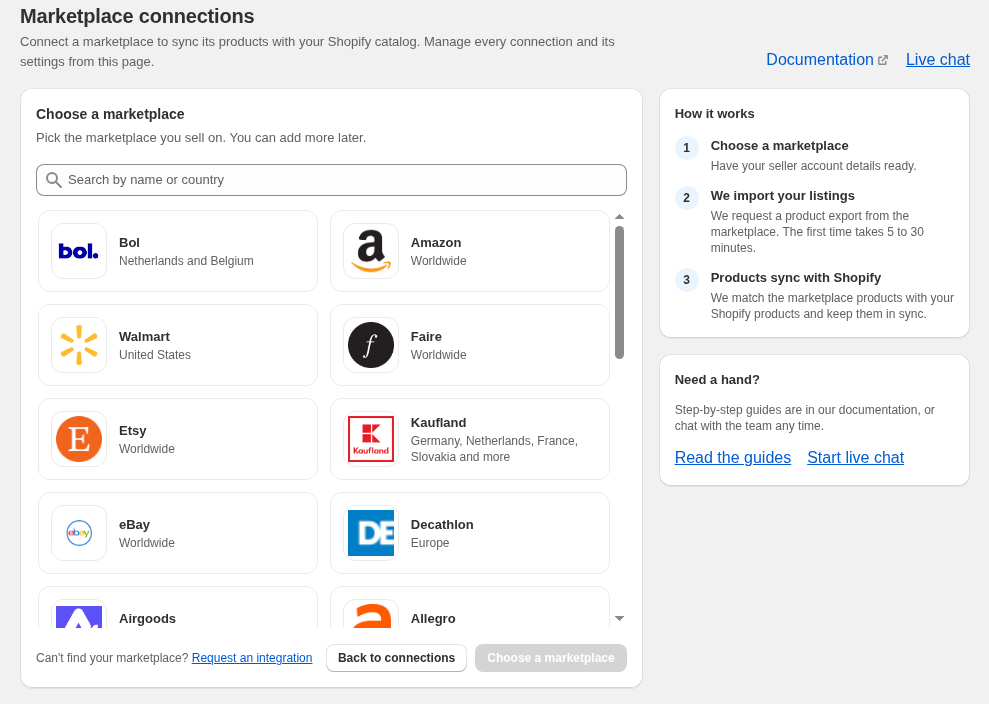
To add an Etsy connection to Market Sync, go to Connections in the app menu, click Add marketplace and choose Etsy.
Step 1 - Add the connection
Open Connections, click Add marketplace, pick Etsy from the list and click Connect Etsy.
Step 2 - Start the authorization
The Add Etsy Connection window opens. Etsy has no EAN/UPC, so products are synced by SKU. Make sure your SKU in Shopify matches the SKU in Etsy.
Click Start Authorization. You will be sent to Etsy to log in.
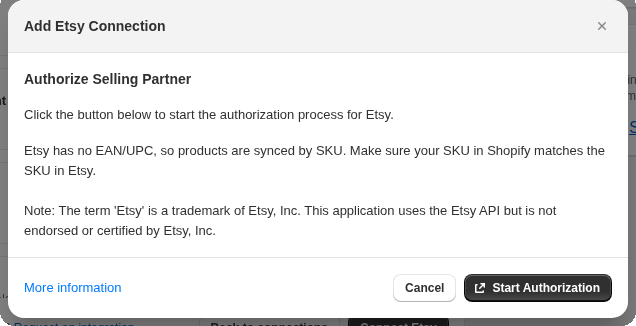
Note: The term ‘Etsy’ is a trademark of Etsy, Inc. This application uses the Etsy API but is not endorsed or certified by Etsy, Inc.
You are sent back to Market Sync and the connection is created.
Was this article helpful?
Thanks for your feedback!